

The voice assistant Alexa -- and its newest iteration, Alexa Plus -- is one of my favorite ways to give voice commands in the smart home, especially since it has the broadest compatibility with third-party devices out of any voice assistant.
Our Picks
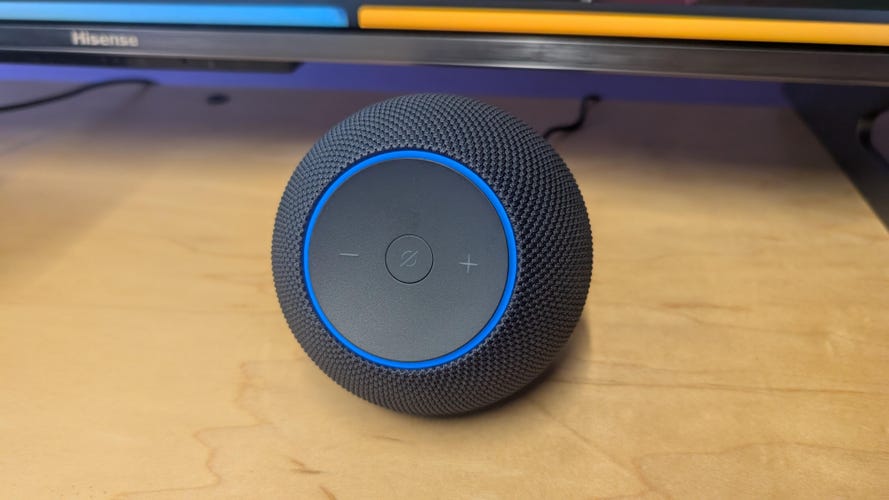
The Echo Studio line roared back in 2025 with a new, compact design that more closely resembles the standard line of Echo speakers, and can take up a spot anywhere you want to put it.
Pros
- Better, compact design
- Upgraded sound
- Works well at home, connected to a TV or as a standalone speaker
- Great entry point for an Alexa smart home
Cons
- Expensive for a smart speaker
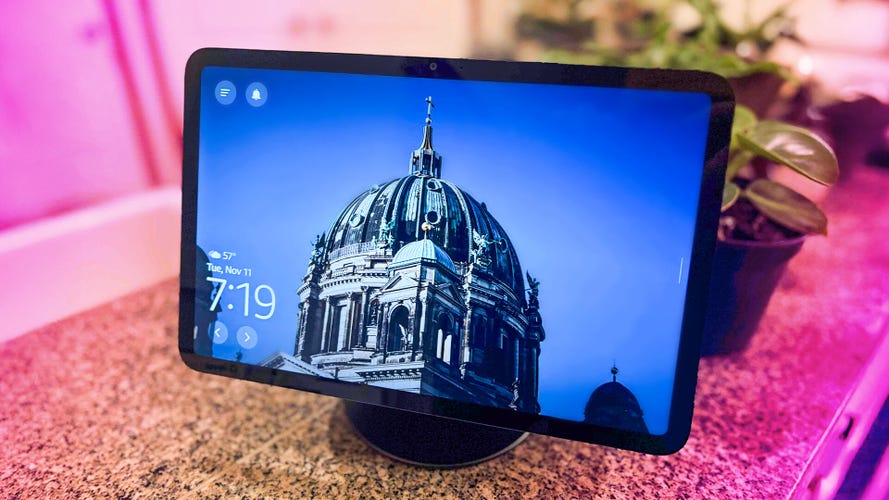
The Echo Show 11 is bigger and brighter than ever, taking some of my favorite aspects of past Echo Shows while leaving clunkier features in the past. I prefer this one in my kitchen, but you can put it anywhere you need a second screen.
Pros
- Larger, crisper screen that's even better for shows and videos
- Good sound for music
- Touchscreen opens up many more possibilities for use while keeping all the speaker benefits
- More affordable than past models
Cons
- Shines more if you have Alexa Plus
- You may need to use the privacy features if you're worried about the camera
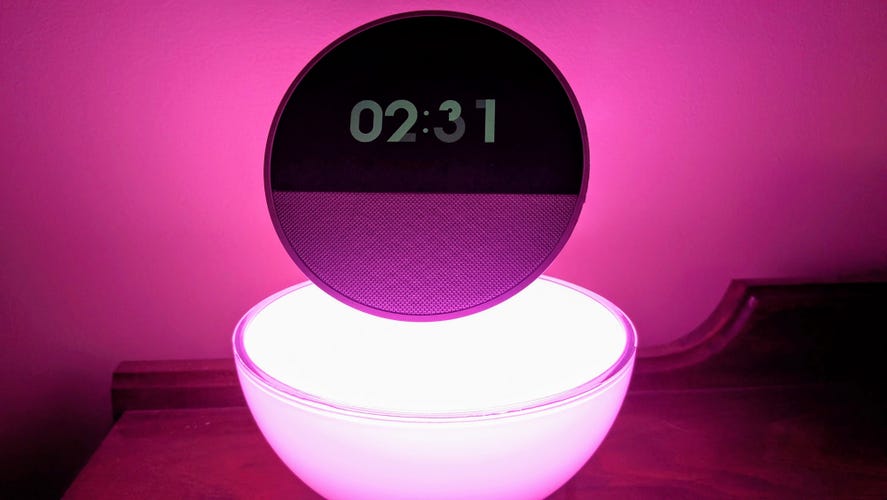
Echo speakers have long been able to work as alarm clocks, but this latest Echo Spot is one of the first specifically designed for waking you up.
Pros
- Compact alarm clock designed with customizable, information screen
- Still has the other Echo capabilities like music streaming, smart home control, morning updates and more
- Physical mic button if you want to turn it off
Cons
- Not everyone needs an $80 alarm clock
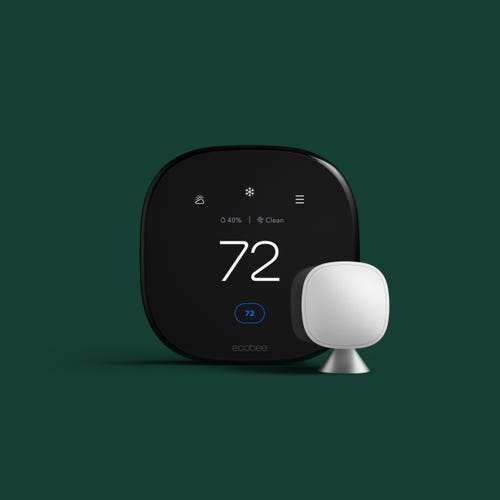
Smart thermostats are an incredible upgrade for a home, automatically adjusting temperatures to help save you time and money while displaying extra info on a sleek screen. The Ecobee Premium is one of the best, and even comes with a satellite sensor so the thermostat can make decisions based on the temperature in the room where you put it.
Pros
- Built-in speaker for either Alexa or Siri voice commands
- Satellite sensor for more customized temperature adjustment
- Air quality sensors built in
- Can show Ecobee cam live views
- Incredibly versatile device that can also save you money
Cons
- A thermostat that can do everything is pricey, so you'll need to spend over $250 for this premium model

Amazon's $80 Smart Thermostat is the least expensive smart thermostat I've seen, which makes it all the more impressive that it does a great job. It has a simple design and Alexa interface that make it easy to set up automatic controls, too.
Pros
- Budget-friendly
- Seamless integration with Alexa app and voice commands
- Responsive touchscreen interface
- Offers advice on energy savings
Cons
- Doesn't work with Google Assistant or Apple HomeKit
- If you don't have a C-wire, requires C-wire adapter
- No remote temperature sensor
- Amazon's data collection policies aren't as good for privacy as alternatives
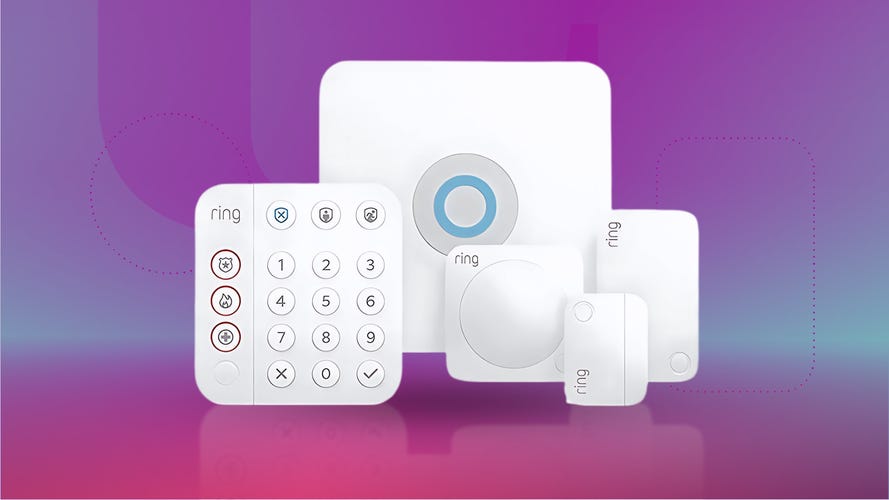
Security systems don't always need voice assistants, but the Amazon-owned Ring Alarm system has a fun trick: With a Ring subscription, you can use Alexa to arm or disarm the security system without needing to punch in a code or bring up the app, saving you some time.
Pros
- A very solid, compact security system
- This starter kit is easy to add on to if necessary
- Easy setup and activation
Cons
- A Ring subscription is required to unlock extra features, such as professional monitoring and, notably, Alexa disarming
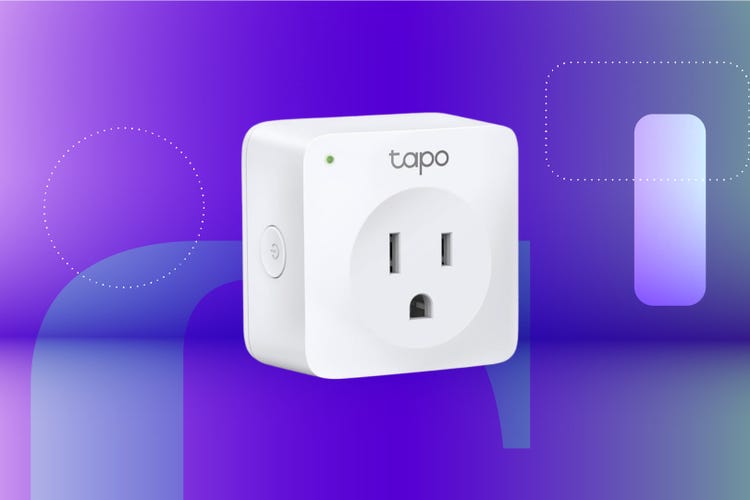
The TP-Link Tapo Smart Wi-Fi Plug Mini is a big name for a tiny smart plug that costs about $13. A smart plug like this one connects via your Wi-Fi connection directly to a wall outlet and converts your non-smart lamps, fans and other gadgets into smart devices.
Pros
- Keeps other outlets free
- Works with Google Home and Amazon Alexa
- Offers plenty of scheduling and timing options
Cons
- Not compatible with Apple HomeKit
- No energy monitoring
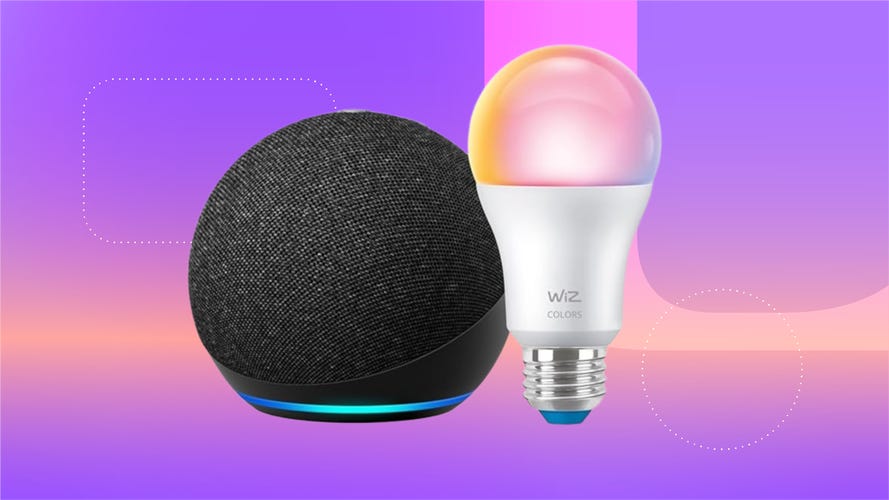
Smart bulbs with voice assistant support let you control color, brightness and other supported features with a quick command, and can work in concert for an entire room.
Pros
- Affordable at around $10
- Full-color support
- Sunset-to-sunrise features with Alexa
- Scheduling and preset mood options available
Cons
- You may want multiple bulbs for full light control in a room

Yale's lock is an excellent all-purpose smart lock with a few different looks and a solid, impressive design. It works with all major home platforms including Alexa, with options for remote locking/unlocking, autolock, guest passes and other handy capabilities.
Pros
- Sturdy with a great keypad design
- Autolocking, remote locking, passes and other important features are included
- Grade 2 BMHA durabilty, better than many smart locks
- Traditional key options are still included in some versions
Cons
- No fingerprint reader
- Make sure you have space for this lock, as its larger than many

I've long enjoyed the performance of Blink's compact outdoor security cameras, with batteries that last well over a year and a simple app that's great for newcomers. Blink recently upgraded the model with a new version that offers 2K resolution that's still around the same price -- and as an Amazon-owned brand, Alexa compatibility is built in.
Pros
- Affordable, durable and compact outdoor camera
- Recently upgraded to 2K resolution
- Easy to use app
- Battery lasted for well over a year in our tests
Cons
- You'll need a subscription for cloud storage and a more expensive subscription for AI features
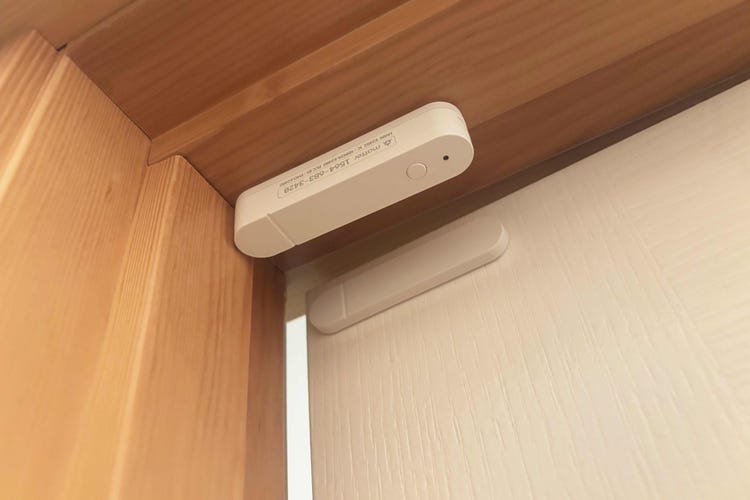
Not everyone needs a full security system, but a little security is still a good idea, and Ikea's 2026 access sensor is one of my favorite places to start. It's under $10, uses AAA batteries and you can set it up in a couple of minutes with adhesive stickers.
Pros
- A valuable access sensor that's under $10
- Setup takes a couple minutes with AAA batteries and Alexa app
- Can guard doors, windows or drawers
- With an Echo speaker, you don't need any other hubs to use
- Can connect to other smart home devices (like a siren) for automations
Cons
- Without a compatible Echo speaker as a hub, you'll need Ikea's own hub, which costs over $100
Plus, Alexa is not only available in Amazon's own Echo and Echo Show lines, but also in smart plugs, smart locks and home security gadgets. That means you can use Alexa for playing music, disarming alarms, turning lights to a different color or just answering questions around the kitchen.
The only question is where to start. I've chosen the latest and greatest Alexa devices to grace your home, not only Amazon's own brands but also handy gadgets you can find a place for anywhere in your home.
What is the best overall Amazon Alexa smart device?

There's no true "best" Alexa device, because there are so many different kinds. But one of the best starting places is Amazon's latest 2025 Echo Studio.
This Echo Studio comes in a more compact shape but still has Dolby Atmos support and great sound for its size. You can use it on any shelf or table, or pair it with a TV. It's also a great hub for connecting to other smart tech as you expand your home's capabilities.
Best Amazon Alexa devices of 2026

Pros
- Better, compact design
- Upgraded sound
- Works well at home, connected to a TV or as a standalone speaker
- Great entry point for an Alexa smart home
Cons
- Expensive for a smart speaker
The Echo Studio line roared back in 2025 with a new, compact design that more closely resembles the standard line of Echo speakers, and can take up a spot anywhere you want to put it.
This Echo can act as a hub for various smart sensors, supports Dolby Atmos audio and offers one 3.75-inch high excursion woofer plus three full-range drivers. In addition to all the voice commands, the speaker can connect with music services such as Apple Music, Pandora and Spotify.
The speaker also works well with the more advanced Alexa Plus AI, which I'll talk more about below. I've been impressed with Amazon's straightforward upgrades to the Echo line in the past year, and this speaker is one of the best examples.
If you want to save money -- over $200 is a lot to spend on a speaker -- the newest Echo Dot Max is a similar option with less far-reaching audio, but only $100.

Pros
- Larger, crisper screen that's even better for shows and videos
- Good sound for music
- Touchscreen opens up many more possibilities for use while keeping all the speaker benefits
- More affordable than past models
Cons
- Shines more if you have Alexa Plus
- You may need to use the privacy features if you're worried about the camera
The Echo Show 11 is bigger and brighter than ever, taking some of my favorite aspects of past Echo Shows while leaving clunkier features in the past. I prefer this one in my kitchen, but you can put it anywhere you need a second screen.
That touchscreen can answer questions, show guides or videos, play your favorite shows from streaming services, act as a digital picture album, show timers or reminders of to-do lists and much more.
The latest display also works especially well with Alexa Plus, as you can see and adjust your choices for more complex setups such as ordering food delivery. And like Echo smart speakers, it's no slouch in the music department (although it won't reach the heights of the Echo Studio).
This model includes a cam for video calls with friends and family, but you can shutter it if you ever feel like that's a privacy risk.

Pros
- Compact alarm clock designed with customizable, information screen
- Still has the other Echo capabilities like music streaming, smart home control, morning updates and more
- Physical mic button if you want to turn it off
Cons
- Not everyone needs an $80 alarm clock
Echo speakers have long been able to work as alarm clocks, but this latest Echo Spot is one of the first specifically designed for waking you up.
The Echo Spot has a small screen to display the time, weather, alarms, the music you're currently playing and more, making it an ideal snooze gadget. It's also nice to be able to mumble commands to turn off or extend wake-up timers and other morning prep.
This speaker can do almost everything a standard Echo speaker can, including control your smart home devices, and includes a manual off switch to turn off the mic if you prefer. All in all, it's a very fun upgrade if you're looking for a new alarm.

Pros
- Built-in speaker for either Alexa or Siri voice commands
- Satellite sensor for more customized temperature adjustment
- Air quality sensors built in
- Can show Ecobee cam live views
- Incredibly versatile device that can also save you money
Cons
- A thermostat that can do everything is pricey, so you'll need to spend over $250 for this premium model
Smart thermostats are an incredible upgrade for a home, automatically adjusting temperatures to help save you time and money while displaying extra info on a sleek screen. The Ecobee Premium is one of the best, and even comes with a satellite sensor so the thermostat can make decisions based on the temperature in the room where you put it.
This is also one of the very few smart thermostats that has a built-in speaker, allowing you to use Alexa voice commands without needing a separate speaker. It also has sensors to monitor air quality and detect breezes from open windows. Add an Ecobee security camera and the thermostat can even show you a live view with two-way audio.
Since this thermostat does everything, it's one of the more expensive items on this list, but it's also a worthwhile home upgrade if you're invested in Alexa.

Pros
- Budget-friendly
- Seamless integration with Alexa app and voice commands
- Responsive touchscreen interface
- Offers advice on energy savings
Cons
- Doesn't work with Google Assistant or Apple HomeKit
- If you don't have a C-wire, requires C-wire adapter
- No remote temperature sensor
- Amazon's data collection policies aren't as good for privacy as alternatives
Amazon's $80 Smart Thermostat is the least expensive smart thermostat I've seen, which makes it all the more impressive that it does a great job. It has a simple design and Alexa interface that make it easy to set up automatic controls, too.
As you'd expect, this thermostat works as well with Alexa given that it's an Amazon product. If you have another compatible Echo device, it can even use it as a presence or temperature sensor to automate thermostat behavior.
Even for those who don't, the thermostat offers a simple, straightforward design that looks great on a wall and feels great to use. It could save you as much as $50 or more in annual energy bills, too.

Pros
- A very solid, compact security system
- This starter kit is easy to add on to if necessary
- Easy setup and activation
Cons
- A Ring subscription is required to unlock extra features, such as professional monitoring and, notably, Alexa disarming
Security systems don't always need voice assistants, but the Amazon-owned Ring Alarm system has a fun trick: With a Ring subscription, you can use Alexa to arm or disarm the security system without needing to punch in a code or bring up the app, saving you some time.
This solid starter kit includes a base station, keypad, contact sensor, motion detector and range extender, all of which performed well in our tests. I also like the Ring Alarm Pro kit, but it adds a Wi-Fi router that's an unnecessary cost for most people, so this five-piece option remains my favorite.

Pros
- Keeps other outlets free
- Works with Google Home and Amazon Alexa
- Offers plenty of scheduling and timing options
Cons
- Not compatible with Apple HomeKit
- No energy monitoring
The TP-Link Tapo Smart Wi-Fi Plug Mini is a big name for a tiny smart plug that costs about $13. A smart plug like this one connects via your Wi-Fi connection directly to a wall outlet and converts your non-smart lamps, fans and other gadgets into smart devices.
Use the Tapo app to connect and control devices -- or enlist Amazon Alexa and use voice control. Say, “Alexa, turn on the reading lamp” to get the Plug Mini to control your favorite light, or use it to quickly reboot your Wi-Fi router.

Pros
- Affordable at around $10
- Full-color support
- Sunset-to-sunrise features with Alexa
- Scheduling and preset mood options available
Cons
- You may want multiple bulbs for full light control in a room
Smart bulbs with voice assistant support let you control color, brightness and other supported features with a quick command, and can work in concert for an entire room.
This Wiz bulb is one of my favorites because it’s very affordable at around $10, offers full-color customization for various lighting moods and supports automatic sunrise-to-sunset activation when used with Alexa.
These bulbs don't require any hubs to connect to Wi-Fi, so setup is as easy screwing the bulb in and opening the Alexa app.

Pros
- Sturdy with a great keypad design
- Autolocking, remote locking, passes and other important features are included
- Grade 2 BMHA durabilty, better than many smart locks
- Traditional key options are still included in some versions
Cons
- No fingerprint reader
- Make sure you have space for this lock, as its larger than many
Yale's lock is an excellent all-purpose smart lock with a few different looks and a solid, impressive design. It works with all major home platforms including Alexa, with options for remote locking/unlocking, autolock, guest passes and other handy capabilities.
This lock is also BHMA Grade 2, higher than the common Grade 3 locks, and highly weather resistant. The only thing it doesn't have is a fingerprint reader option, which is too bad but not a dealbreaker.

Pros
- Affordable, durable and compact outdoor camera
- Recently upgraded to 2K resolution
- Easy to use app
- Battery lasted for well over a year in our tests
Cons
- You'll need a subscription for cloud storage and a more expensive subscription for AI features
I've long enjoyed the performance of Blink's compact outdoor security cameras, with batteries that last well over a year and a simple app that's great for newcomers. Blink recently upgraded the model with a new version that offers 2K resolution that's still around the same price -- and as an Amazon-owned brand, Alexa compatibility is built in.
That means you can view live feeds through an Echo Show and get other tricks included. This model also has two-way audio, color night vision and zooming capabilities. It needs a plug-in hub, but comes with one at no extra charge (although you'll have to upgrade it if you want local video storage).
Blink has recently upgraded its subscriptions with a new tier that adds AI capabilities, too, including text descriptions of what the camera captures when it notices a person, starting at $20 per month.

Pros
- A valuable access sensor that's under $10
- Setup takes a couple minutes with AAA batteries and Alexa app
- Can guard doors, windows or drawers
- With an Echo speaker, you don't need any other hubs to use
- Can connect to other smart home devices (like a siren) for automations
Cons
- Without a compatible Echo speaker as a hub, you'll need Ikea's own hub, which costs over $100
Not everyone needs a full security system, but a little security is still a good idea, and Ikea's 2026 access sensor is one of my favorite places to start. It's under $10, uses AAA batteries and you can set it up in a couple of minutes with adhesive stickers.
Once it's attached, it can send alerts to your phone through the app of your choice thanks to Matter support. It's an especially good pairing with an Echo speaker, since you'll need a Matter hub to control it and create home automations.
Factors to consider when choosing an Alexa device

Alexa Plus can now order you food -- if you have the right device.
Privacy
What exactly is Alexa listening to, and how does Amazon use your voice recordings? I have a whole guide on Alexa settings to adjust for privacy here that you should read. Amazon has removed the ability to not send voice recordings for automatic analysis since Alexa Plus, but you can still adjust when recordings of your commands are automatically deleted, among other changes.
As for Alexa eavesdropping, it's not a huge issue these days. Alexa only starts listening in when the wake word is activated, and that rarely happens by accident -- although sometimes casual conversation or certain TV sounds can make a speaker think it heard "Alexa," although that's rare in my experience.
Finally, today's Echos and Echo Shows have manual shutters and buttons to turn off mics and cameras if you're worried about anyone using them remotely.
Type of smart home device
There are literally thousands of Alexa and Alexa-compatible devices that you can buy on the market right now, from smart speakers and home security devices to smart lighting and smart thermostats. Before you make a purchase, consider how you plan to use your Alexa device so you can be sure to find the one that best suits your needs.
Alexa has some of the best compatibility on the market, but if you want to make sure, look at product specs to ensure they include Alexa or the Matter certification, which also means the device should be Alexa-friendly.

Alexa Plus does feel significantly different, but it depends on how you use voice assistants in general.
Alexa Plus
Alexa Plus is Amazon's generative AI version of Alexa. It's a lot more talkative, it can connect to third-party services such as Uber and Grubhub and it's much more conversational -- you don't have to be as strict with your voice commands. Amazon has also included several different personalities for you to try out.
In general, I like Alexa Plus, although it can get a little weary if you choose the more expressive modes. And like many chatbots, it will confidently lie to you about what it can do, so you'll have to double-check some of the voice assistant's claims.
If you're interested, you can get Alexa Plus free with an Amazon Prime subscription, or pay $20 per month without one.
Installation and setup
Amazon makes installation seamless with the help of Alexa voice commands. Plus, many of the best Alexa and Alexa-compatible devices offer a companion app to help with installation and controlling the device.
Before buying an Alexa device, consider your other smart home devices, too. It wouldn't make sense to buy an Alexa device if your smart home is already made up of an ecosystem of Google Assistant or Siri devices.
Price
Cost is always a factor. The good news is most of these Alexa devices are budget-friendly, ranging from $10 to $300, depending on the device. If you need a smart speaker to start, you can find budget Echos for around $50.
Location
Alexa devices with mics designed to pick up voice commands should be near enough that you aren't always shouting at them. If they have screens, like the Echo Shows, you'll want those screens facing toward the center of the room so they're easily visible. All Echo devices require a nearby outlet unless you want to try out hit-or-miss battery packs.
How we test Amazon Alexa devices

Kids can ask Alexa to guide them through making short stories.
Hands-on testing is critical to the CNET mission. No matter what device or product we're evaluating, we'll always be transparent about the unbiased and unmatched testing standards that went into our review.
Since Alexa-compatible devices are all different in type and ability, and since testing home security devices is very different from testing smart displays, there wasn't one single testing method to build this list. You can trust that our CNET experts have spent hours doing in-depth testing with each product, including sound tests, operation tests and more.
In general, we always test for setup and installation, design, extra features, performance and value before determining a verdict. For more information, you can explore our guide on how we test home security systems and services, and how we test home security cameras and video doorbells.
Other Amazon Alexa devices we tested
There are thousands of Alexa and Alexa-compatible devices on the market and we've tested most of them. Considering the magnitude and volume of devices, we can't list every single one here. We can direct you to our other best lists with devices that are compatible with Alexa. Here are a few to start:
- Best smart speakers
- Best smart displays
- Best smart plugs
- Best home security cameras
- Best home security systems
- Best smart thermostats
- Best smart locks
- Best DIY home security systems

