

Pros
- Compact, improved design
- Made for local storage
- App improvements also shine, making data easier to manage
- No subscriptions or extra fees
- Magnetic mount plus a screw-in base give lots of installation options
- Color night vision, two-way audio and AI detection also found room in this palm-sized camera
Cons
- You'll need a HomeBase to enable full local video storage, which adds to the initial costs
- Only a 1080p resolution
Eufy has long been one of my top recommendations for a privacy-first security camera, ready for those who want to ditch monthly subscriptions and avoid using a company's cloud storage for their own security videos.
Now Eufy is back with its local video storage design and a new, compact camera, the EufyCam C35 for $90, although currently on sale for below $60. Not only is it the best entry-level Eufy camera I've tested, but it's also my new favorite to get local storage and dodge ongoing fees if you're willing to pair it with a Eufy HomeBase.
Here's what I found during my testing, and why this is Eufy's best security camera yet.
Read more: The Best Security Cameras Without Subscriptions for 2026
Eufy's most compact cam so far -- now with magnets

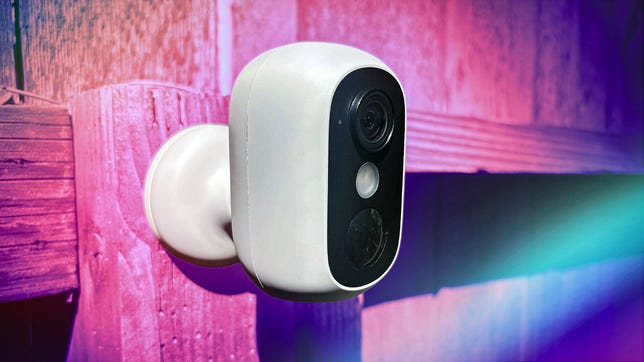
Eufy's new cam is compact and durable.
Eufy has upgraded its design with this compact, rounded C35 camera, ready for both indoor and outdoor use with an IP67 weather rating and built-in battery. It sports a 1080p and manages to fit not only two-way audio on the palm-size cam, but also onboard AI technology to recognize people, pets and vehicles, plus color night vision when things get dark.
Those features are fairly common on Eufy cameras, but I've never seen them in such a small version, and it feels like the camera got a durability upgrade, too. (I'll have to toss it off my roof with the rest of my cams and see how it performs.)

Thanks to magnets, this new Eufy cam can attach to metal surfaces with ease.
Installation is relatively painless with a two-screw base and lock-on mount, but Eufy had one more upgraded surprise for me to find. The back of the mount has magnets, so you can attach it to the right surfaces without needing the base. That could include any metal strips or trim on your house, as well as refrigerators and metal lockers you may use indoors.
Finally, this battery camera also supports Eufy's optional solar panel add-on, so if you use it outside near a sunny spot, you can keep the battery charged up.
A local storage setup anyone can use

You'll need a HomeBase and preferably a microSD card to enable your local storage setup.
Eufy prides itself on not having monthly fees or contracts, but where does that leave your video storage options?
You could avoid storing video altogether, but I don't advise it. It's very useful to have a history of captured events that you can download, especially if the camera captures a trespasser or illegal activity. The alternative is pairing the C35 with a Eufy base, like the HomeBase 3 I had from previous testing or the HomeBase Mini, which the C35 cameras sometimes come bundled with. This cam won't work with the HomeBase 2, so make sure you check compatibility.
This is a trade-off in terms of initial costs. You'll never have to worry about cloud storage data getting hacked or being used to train AI, and there's no subscription manage, but the HomeBase 3 does cost an extra $150. While it has 16GB of onboard storage, you'll probably want to add a microSD card, which will further increase the price of this setup.

Once set up, local storage is especially easy to manage.
Once everything is running, however, it works great and auto-connects with no extra work needed. Eufy makes it easy to see and clear HomeBase storage as needed, and the process functions well for viewing and managing events. There's even a cloud subscription for those who really don't mind paying the fees, but that's not Eufy's strong suit.
Eufy's app has seen improvements, too

Eufy's app is better, but there's still a lot to master here.
In the past, I've knocked Eufy a little for its app, which has seemed bloated and a bit too add-forward for me. Eufy's done some work on the app since then, and it's an improvement in nearly every way.
Menus are cleaner and clearer, ads are nonexistent or less intrusive depending on where you go in the app, and while it's still packed with settings, they're a bit easier to understand now.

You can tweak all kinds of camera settings, including just how the motion detection works.
Those settings include options to adjust motion sensitivity, night vision, how two-way audio works and what notifications get pushed to the front of your phone. You can also adjust battery modes to save battery and lower the resolution of saved videos to help your local storage last longer.
Delve deeper, and you'll find options to enable or disable various AI recognition features for humans (something a HomeBase enhances), set up privacy zones that the camera will ignore and many more things to tweak if you want to. If you've never set up a security camera before, you can spend a lot of time here learning what Eufy's model can do -- that involves a small learning curve, but it's time well spent.

Accesing your event history is no trouble with Eufy's latest app.
Eufy does support Amazon Alexa and Google Home, but options in these apps will be significantly more limited, so you'll want to use Eufy's own app for anything complex.
Final thoughts on the EufyCam C35
Eufy's no-subscription security options have never looked better. The EufyCam C35 is a compact upgrade to Eufy's past cams, and the app has seen notable improvements as well. IF you're looking for a security camera that's firmly out of the cloud and away from monthly subscription fees, I haven't seen a better option.
However, the focus on local storage means your initial costs will be high, since you'll want to pair the $90 cam with a $150 HomeBase 3 or, at least, the smaller HomeBase mini seen in this $130 bundle that seen in this $130 bundle Eufy also offers.
That's some serious investment when you can find other security cams for under $30, but it's also one of the most complete local storage setups I've seen, and it's easy for the average home-haver to understand and install.
Speaking of installation, I also like the magnetic points on the mount, which let you attach it to metal surfaces without a base. I hope Eufy continues to innovate, because these new design choices are really working for the security brand.
