

Some laptops are designed to be left at home, where they act like desktop computers that you can lug from room to room. Other laptops place a priority on portability, where they are light enough to be tossed in your bag for daily commutes and regular travel, allowing you to return home at the end of the day without sore shoulders. The picks you see here fall into the latter category, but this isn’t simply a selection of the smallest laptops we’ve reviewed. These are our favorite lightweight laptops we’ve tested in the past year, and they span a variety of screen sizes, from 13 to 16 inches.
Our Picks
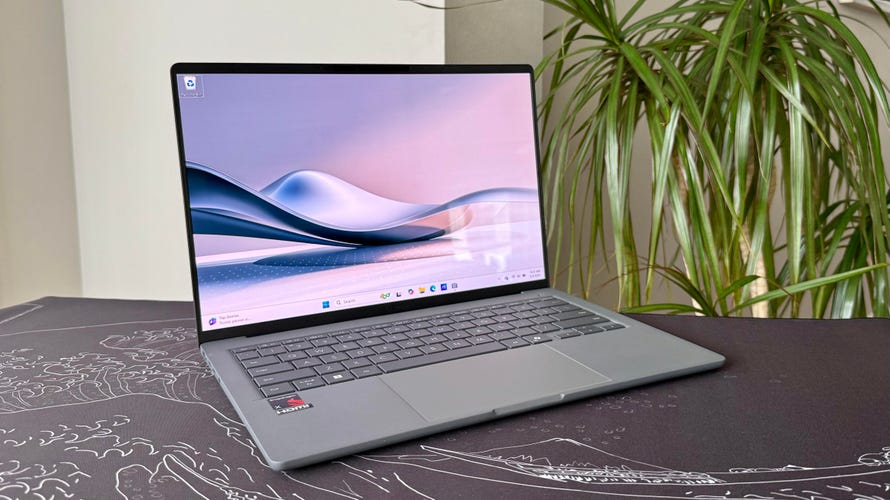
Built around an Arm-based Qualcomm Snapdragon X processor, the Zenbook A14 is the lightest and second-longest running Copilot Plus PC we've tested. It weighs less than 2.2 pounds and offers a battery life of more than 24 hours. Its Ceraluminum shell allows the Zenbook A14 to be incredibly light yet rigid, and its 14-inch OLED display is excellent. It also serves up ample RAM and storage for the price. If portability is paramount, then the Zenbook A14 is the pick.
Pros
- Incredibly thin and light without feeling flimsy
- All-day-and-all-night battery life
- OLED display at this price is a nice surprise
- Ample RAM and storage for the price too
Cons
- Meh performance from Snapdragon X CPU
- Meh mechanical touchpad
- Meh speakers
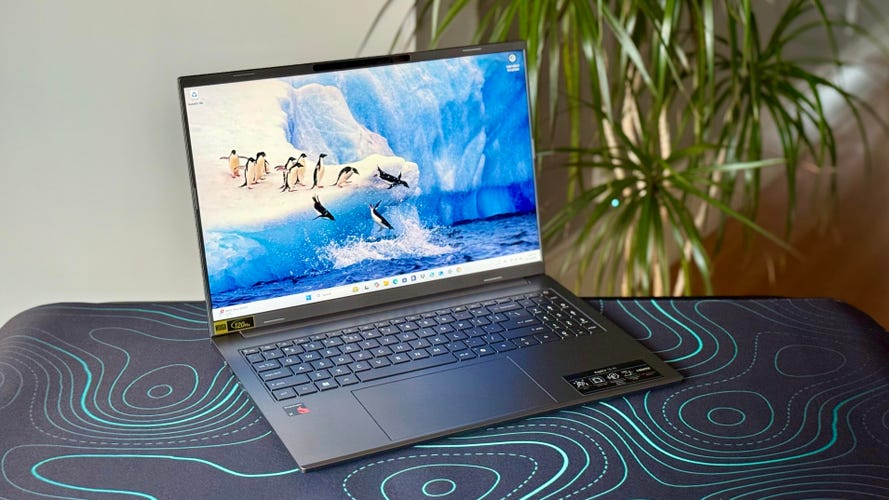
Weighing less than 3.5 pounds and offering amazing battery life, the Acer Aspire 16 AI is a 16-inch laptop that's easy to take with you.
Pros
- Optimal balance of screen size and laptop weight
- Incredible battery life
- Comfortable keyboard and roomy touchpad
- Crisp 1440p webcam
- Excellent external expansion options
Cons
- Design can't be described as "exciting"
- So-so speakers
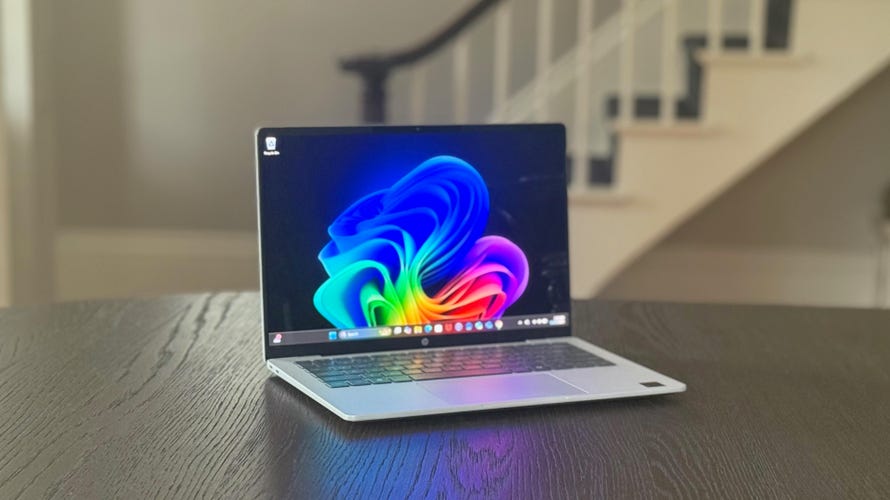
Only a few weeks after ceding the battery life throne to Lenovo in our tests, HP has snatched back the crown with the OmniBook 5 14.
Pros
- Unbelievable battery life
- Sturdy, stylish and compact design
- OLED display delivers deep blacks, vivid colors
- Generous RAM and SSD for the price
Cons
- OLED display isn't the brightest
- Slow USB-C ports

The Prestige 14 Flip AI has a Core Ultra Series 3 processor from Intel’s new Panther Lake series and offers an unprecedented combination of 3D graphics power and all-day battery life.
Pros
- Playable framerates from integrated Intel Arc B390 graphics
- Around-the-clock battery life
- Thin and light and quiet
- MSI's new Prestige design is huge improvement
Cons
- Display is only 60Hz
- Bottom panel gets hot during games
- Diving-board effect with mechanical touchpad

The MacBook Neo is easily the best laptop for school use, especially if you (or the student you're buying for) already have an iPhone. The two devices work seamlessly together. At $599, the Neo is nearly half the price of the cheapest MacBook Air, and students and teachers can get it for only $499. Given the convenience and security that Touch ID provides, however, I'd view Apple's $100 educational discount as a way to get the added Touch ID (along with more storage) for free, rather than lowering the price of the base model.
Pros
- Premium MacBook look and feel at much lower cost
- 13-inch display not much smaller than Macbook Air's
- A18 Pro chip is powerful enough to provide fulfilling MacOS experience
- Surprisingly impressive sound from stereo speakers
Cons
- Touch ID costs $100 extra
- Baseline 256GB SSD will fill up fast
- No MagSafe or fast charging
- Smaller battery and shorter battery life than MacBook Air
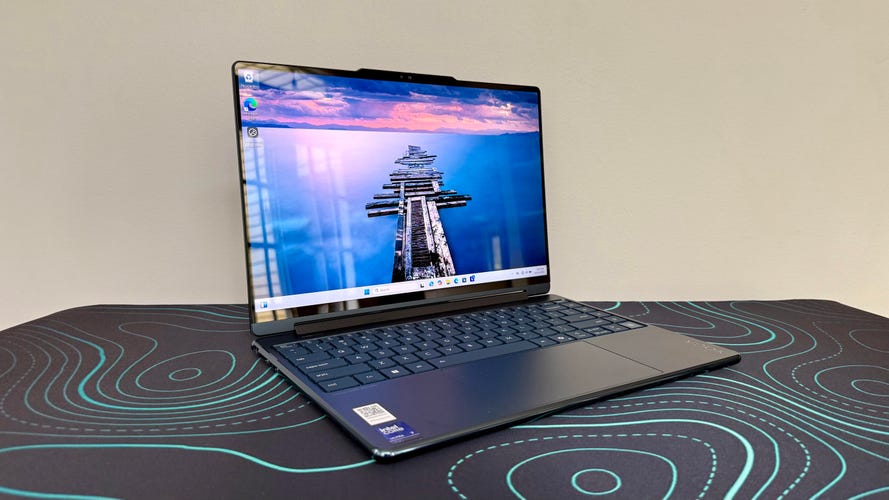
The Lenovo Yoga 9i 2-in-1 Aura Edition is greater than the sum of its parts. Based on a common Intel Core Ultra Series 2 processor, its component lineup is not all that unusual. But placed inside a sleek and compact enclosure and outfitted with a beautiful 2.8K OLED display becomes a truly exceptional two-in-one.
Pros
- Beautiful OLED display
- Compact package with sleek aesthetics
- Record-setting battery life
- Great audio and webcam
Cons
- Mechanical rather than haptic trackpad
- No HDMI port or SIM card reader
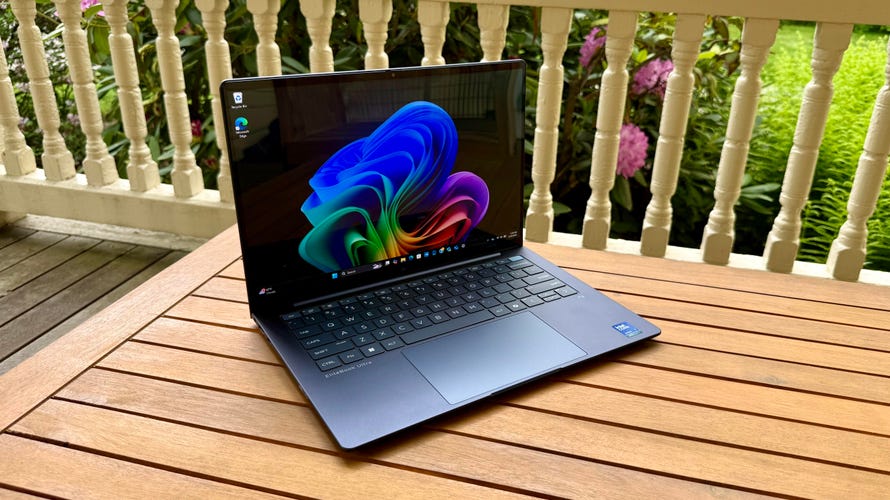
If you love the sleek look and great portability of a MacBook Air but need a Windows laptop for work, then HP's flagship EliteBook Ultra is a great alternative.
Pros
- Excellent 2.8K OLED display
- Beautiful design that's also compact and lightweight
- Competitive application and AI performance from Intel Lunar Lake CPU
Cons
- Very expensive when not on sale
- Battery life is good but not great
LAPTOP DEALS OF THE WEEK
- $600 (save $600)
- $759 (save $510)
What is the best lightweight laptop?
We have a favorite lightweight MacBook and a number of recommendations for the best and lightest Windows laptops. Most are less than 3 pounds, with the heaviest being a 16-inch model that still weighs less than 3.5 pounds.
The new MacBook Neo is incredibly affordable and portable. The Asus ZenBook A14 is still the lightest 14-inch laptop I've tested; it weighs barely more than 2 pounds and supplies a battery life of more than 24 hours. The HP OmniBook 5 14 weighs a bit more but offers even longer battery life at nearly 30 hours. And the Acer Aspire 16 AI is proof that a 16-inch laptop can be ultraportable.
Our experts have decades of experience testing laptops under controlled conditions in the CNET Labs. In addition to benchmark testing to assess a laptop’s performance, we also perform extensive hands-on tests to assess a laptop’s design and features, including getting an official weight for each one that we review.
Best lightweight laptops for 2026


Pros
- Incredibly thin and light without feeling flimsy
- All-day-and-all-night battery life
- OLED display at this price is a nice surprise
- Ample RAM and storage for the price too
Cons
- Meh performance from Snapdragon X CPU
- Meh mechanical touchpad
- Meh speakers
Built around an Arm-based Qualcomm Snapdragon X processor, the Zenbook A14 is the lightest and second-longest running Copilot Plus PC we've tested. It weighs less than 2.2 pounds and offers a battery life of more than 24 hours. Its Ceraluminum shell allows the Zenbook A14 to be incredibly light yet rigid, and its 14-inch OLED display is excellent. It also serves up ample RAM and storage for the price. If portability is paramount, then the Zenbook A14 is the pick.


Pros
- Optimal balance of screen size and laptop weight
- Incredible battery life
- Comfortable keyboard and roomy touchpad
- Crisp 1440p webcam
- Excellent external expansion options
Cons
- Design can't be described as "exciting"
- So-so speakers
Weighing less than 3.5 pounds and offering amazing battery life, the Acer Aspire 16 AI is a 16-inch laptop that's easy to take with you.
Why we like it
The Aspire 16 AI offers an optimal balance of screen size and system weight, making it a unique laptop: the rare 16-inch ultraportable. Plus, its battery life is fantastic, which lets you lighten your load further by leaving the power cord at home. If you are looking for an affordable and portable productivity machine, the Aspire 16 AI checks a lot of boxes.
Who it’s best for
Budget laptop shoppers who are unwilling to choose between screen size and a light weight. The 16-inch Aspire 16 AI doesn’t weigh much more than the average 14-inch laptop, giving you extra screen real estate without sacrificing much in portability.
Who shouldn’t buy it
Students and others constantly on the go will be better served with a smaller, 14-inch laptop that’s more compact and even lighter than the Aspire 16 AI.


Pros
- Unbelievable battery life
- Sturdy, stylish and compact design
- OLED display delivers deep blacks, vivid colors
- Generous RAM and SSD for the price
Cons
- OLED display isn't the brightest
- Slow USB-C ports
Only a few weeks after ceding the battery life throne to Lenovo in our tests, HP has snatched back the crown with the OmniBook 5 14.
Why we like it
For starters, it runs and runs (and runs and runs). It’s the current battery life champ, lasting more than 28 hours in testing. In addition to record-setting battery life, the OmniBook 5 14 offers a simple, elegant design and easy-to-carry weight -- plus, an OLED display that delivers stellar contrast and vivid colors. It also supplies an ample 32GB of RAM and a roomy 1TB SSD, neither of which is a given in a laptop that costs less than $1,000. It has a full price of $1,100 but can usually be found for hundreds less from HP.
Who it’s best for
For students and others constantly on the go, the OmniBook 5 14 is a fantastic pick at a great price.
Who shouldn’t buy it
If you are concerned about Windows-on-Arm compatibility issues, then you should skip the Snapdragon X-based OmniBook 5 14 and go for an Intel- or AMD-based laptop.


Pros
- Playable framerates from integrated Intel Arc B390 graphics
- Around-the-clock battery life
- Thin and light and quiet
- MSI's new Prestige design is huge improvement
Cons
- Display is only 60Hz
- Bottom panel gets hot during games
- Diving-board effect with mechanical touchpad
The Prestige 14 Flip AI has a Core Ultra Series 3 processor from Intel’s new Panther Lake series and offers an unprecedented combination of 3D graphics power and all-day battery life.
Why we like it
It’s the first laptop with integrated graphics I’ve tested that delivers playable 3D framerates in AAA titles. So, without needing a dedicated GPU, the Prestige 14 Flip AI is compact, portable and quiet during operation. These are not things that usually describe a laptop capable of playing games. And it offers incredible battery life -- calling it “all-day” battery life undersells it.
Who it’s best for
Anyone who wants a do-it-all laptop with enough power for gamers and creators inside a compact, lightweight design with luxuriously long battery life.
Who shouldn’t buy it
If you're shopping for a true gaming laptop, then you’ll still want a model with dedicated Nvidia RTX graphics that supplies higher frame rates. You’ll also want a display that’s faster than the 60Hz panel found here.


Pros
- Premium MacBook look and feel at much lower cost
- 13-inch display not much smaller than Macbook Air's
- A18 Pro chip is powerful enough to provide fulfilling MacOS experience
- Surprisingly impressive sound from stereo speakers
Cons
- Touch ID costs $100 extra
- Baseline 256GB SSD will fill up fast
- No MagSafe or fast charging
- Smaller battery and shorter battery life than MacBook Air
The MacBook Neo is easily the best laptop for school use, especially if you (or the student you're buying for) already have an iPhone. The two devices work seamlessly together. At $599, the Neo is nearly half the price of the cheapest MacBook Air, and students and teachers can get it for only $499. Given the convenience and security that Touch ID provides, however, I'd view Apple's $100 educational discount as a way to get the added Touch ID (along with more storage) for free, rather than lowering the price of the base model.
Why we like it
It has the same luxurious, all-aluminum design as Apple’s other MacBooks, and its 13-inch display is nearly as big as the 13.6-inch Air’s. The Neo’s iPhone chip can’t match the performance of an M-series processor, but it’s still powerful enough to provide a smooth MacOS experience for most people.
Who it’s best for
Anyone on a student budget who can’t spend $1,000 or more on a laptop, especially if you already own an iPhone, because iOS and MacOS work so well together.
Who shouldn’t buy it
Students in STEM or design programs will likely need more power than the Neo offers and will need to spend more on a MacBook Air or even a MacBook Pro.


Pros
- Beautiful OLED display
- Compact package with sleek aesthetics
- Record-setting battery life
- Great audio and webcam
Cons
- Mechanical rather than haptic trackpad
- No HDMI port or SIM card reader
The Lenovo Yoga 9i 2-in-1 Aura Edition is greater than the sum of its parts. Based on a common Intel Core Ultra Series 2 processor, its component lineup is not all that unusual. But placed inside a sleek and compact enclosure and outfitted with a beautiful 2.8K OLED display becomes a truly exceptional two-in-one.
Why we like it
This 14-inch ultraportable two-in-one is well-crafted, well-specced and remarkably well-priced. We love the trim and sturdy chassis, beautiful 2.8K OLED display and unique rotating soundbar that produces robust audio output. And the Yoga 9i runs and runs and runs.
Who it’s best for
The Yoga 9i is perfectly tailored for remote or office workers -- or really anyone who wants a modern laptop that can also rotate into a tablet. Its record-setting battery life will let you leave the charger at home for days at a time and makes up for the fact that this premium two-in-one lacks a premium haptic touchpad.
Who shouldn’t buy it
Anyone who demands a haptic touchpad in a premium laptop. And students and other budget shoppers can save some money and still get a great package with Lenovo’s mainstream Yoga 7 series.


Pros
- Excellent 2.8K OLED display
- Beautiful design that's also compact and lightweight
- Competitive application and AI performance from Intel Lunar Lake CPU
Cons
- Very expensive when not on sale
- Battery life is good but not great
If you love the sleek look and great portability of a MacBook Air but need a Windows laptop for work, then HP's flagship EliteBook Ultra is a great alternative.
Why we like it
With a spectacular 14-inch, 2.8K OLED display wrapped up in an elegant and compact enclosure, the EliteBook Ultra G1i deserves its Ultra label. It definitely has a premium look and feel that's on par with a MacBook Air in terms of being thin and light yet rigid and sturdy. Its Intel Lunar Lake CPU is a well-rounded performer with great efficiency for good battery life that'll get you through almost any workday on a single charge.
Who it's best for
With its compact chassis and deluxe design, the EliteBook Ultra G1i is well suited for traveling executives or anyone who appreciates a small, lightweight OLED laptop for work.
Who shouldn't get it
Anyone who can't wait for it to go on sale or isn't purchasing at a quantity that qualifies for a volume-pricing discount should take a pass. At its sale price of $1,899 or $1,999, the EliteBook Ultra G1i is an excellent value and a great choice for your next work laptop, but it's harder to recommend at its full price of nearly $3,000.
Other laptops we've tested
M5 MacBook Air Review (13-inch, 2026): Go big or go Neo.
Dell XPS 14: It's great to see Dell bring back the XPS and do so with such style.
GeekBook X14 Pro: Geekom’s first laptop is impressively thin and light but battery life disappoints. And I detest the touch pad.
Lenovo IdeaPad 5i 16 2-in-1 Gen 10: Lenovo's low-cost, 16-inch two-in-one is a versatile machine, but it forces you to live with more than a couple of compromises in the design.
Lenovo Yoga Pro 9i Pro 16 Aura Edition: Centered around a gorgeous 16-inch OLED display, this kick-ass Yoga laptop provides the performance and build that graphics pros demand.
Microsoft Surface Pro (12-inch): The 12-inch version of Microsoft's detachable two-in-one will suffice for most users, but getting nickel-and-dimed by optional accessories that feel quite necessary is annoying.
Dell 14 Premium: Dell’s creator laptop is rock solid to a fault.
Dell 16 Premium: It’s a good fit for creators as long as you aren't turned off by its peculiar design, hefty weight and high price.
Lenovo LOQ 15: This budget gaming laptop has an outdated design but serves up modern components and good 3D performance for the price.
Lenovo ThinkPad X1 2-in-1: This business convertible delivers great build quality and battery life but the display disappoints.
HP Omen 16: This Nvidia GeForce RTX 5060 rig offers good looks and competitive 1080p performance along with surprisingly long battery life and a cool twist on four-zone RGB keyboard backlighting
Alienware Aurora 16: I tested two Alienware Aurora gaming laptops, and this is not the one to get.
Alienware Aurora 16X: This is the Aurora to get.
Lenovo Legion 5i Gen 10: I was impressed with this midrange gaming laptop's 3D performance, but its vibrant, surprisingly bright OLED display puts it over the top.
Acer Nitro V 16S AI: This budget gaming laptop serves up a big screen and big value.
Lenovo ThinkPad X9 14 Aura Edition: It offers a cheap path to an OLED ultraportable, but is a ThinkPad a ThinkPad without the little red nub in the middle of the keyboard?
HP OmniBook X Flip 14: This two-in-one laptop offers style, value and configuration options abound, including a 3K OLED display for only an extra $100.
Microsoft Surface Laptop (13-inch): It’s compact, solidly built and great for travel, but the 13.8-inch version is the better choice as your daily driver.
How we test laptops
The review process for laptops consists of two parts: performance testing under controlled conditions in the CNET Labs and extensive hands-on use by our reviewers. This includes evaluating a device's aesthetics, ergonomics and features with respect to price. A final review verdict is a combination of both objective and subjective judgments.
We test all laptops with a core set of benchmarks, including Primate Labs Geekbench 6, Cinebench 2024, PCMark 10, a variety of 3DMark benchmarks (whichever can run on the laptop), UL Procyon Photo and Video (where supported), and our own battery life test. If a laptop is intended for gaming, we'll also run benchmarks from Guardians of the Galaxy, The Rift Breaker (CPU and GPU) and Shadow of the Tomb Raider.
For the hands-on, the reviewer uses it for their work during the review period, evaluating how well the design, features (such as the screen, camera and speakers) and manufacturer-supplied software operate as a cohesive whole. We also place importance on how well they work given their cost and where the manufacturer has potentially made upgrades or tradeoffs for its price.
The list of benchmarking software and comparison criteria we use changes over time as the devices we test evolve. You can find a more detailed description of our test methodology on our How We Test Computers page.
Factors to consider
There are a ton of laptops on the market at any given moment, and almost all of those models are available in multiple configurations to match your performance and budget needs. If you're feeling overwhelmed with options when looking for a new laptop, it's understandable. To help simplify things for you, here are the main things you should consider when you start looking.
Price
The search for a new laptop for most people starts with price. If the statistics chipmaker Intel and PC manufacturers hurl at us are correct, you'll be holding onto your next laptop for at least three years. If you can afford to stretch your budget a little to get better specs, do it. That stands whether you're spending $500 or more than $1,000. In the past, you could get away with spending less upfront and look to upgrade memory and storage in the future. Laptop makers are increasingly moving away from making components easily upgradable, so it's best to get as good a laptop as you can afford from the start.
Generally speaking, the more you spend, the better the laptop. That could mean better components for faster performance, a nicer display, sturdier build quality, a smaller or lighter design from higher-end materials or even a more comfortable keyboard. All of these things add to the cost of a laptop. I'd love to say $500 will get you a powerful gaming laptop, for example, but that's not the case. Right now, the sweet spot for a reliable laptop that can handle average work, home office or school tasks is between $700 and $800 and a reasonable model for creative work or gaming is upward of about $1,000. The key is to look for discounts on models in all price ranges so you can get more laptop features for less.
Operating system
Choosing an operating system is part personal preference and part budget. For the most part, Microsoft Windows and Apple's MacOS do the same things (except for gaming, where Windows is the winner), but they do them differently. Unless there's an OS-specific application you need, go with the one you feel most comfortable using. If you're not sure which that is, head to an Apple store or a local electronics store and test them out. Or you can ask friends or family to let you test theirs for a bit. If you have an iPhone or iPad and like it, chances are you'll like MacOS too.
When it comes to price and variety (and, again, PC gaming), Windows laptops win. If you want MacOS, you're getting a MacBook. Apple's MacBooks regularly top our best lists, but the least expensive one is the M1 MacBook Air for $999. It is regularly discounted to $750 or $800, but if you want a cheaper MacBook, you'll have to consider older refurbished ones.
Windows laptops can be found for as little as a couple of hundred dollars and come in all manner of sizes and designs. Granted, we'd be hard-pressed to find a $200 laptop we'd give a full-throated recommendation to, but if you need a laptop for online shopping, email and word processing, they exist.
If you are on a tight budget, consider a Chromebook. ChromeOS is a different experience than Windows; make sure the applications you need have a Chrome, Android or Linux app before making the leap. If you spend most of your time roaming the web, writing, streaming video or using cloud-gaming services, they're a good fit.
Size
Remember to consider whether having a lighter, thinner laptop or a touchscreen laptop with a good battery life will be important to you in the future. Size is primarily determined by the screen -- hello, laws of physics -- which in turn factors into battery size, laptop thickness, weight and price. Keep in mind other physics-related characteristics, such as an ultrathin laptop isn't necessarily lighter than a thick one, you can't expect a wide array of connections on a small or ultrathin model and so on.
Screen
When it comes to deciding on a screen, there are a variety of considerations: how much you need to display (which is surprisingly more about resolution than screen size), what types of content you'll be looking at and whether you'll be using it for gaming or creative work.
You want to optimize pixel density; that's the number of pixels per inch the screen can display. Although other factors contribute to sharpness, a higher pixel density usually means sharper rendering of text and interface elements. (You can easily calculate the pixel density of any screen at DPI Calculator if you don't feel like doing the math, and you can also find out what math you need to do there.) We recommend a dot pitch of at least 100 pixels per inch (ppi) as a rule of thumb.
Because of the way Windows and MacOS scale for the display, you're frequently better off with a higher resolution than you'd think. You can always make things bigger on a high-resolution screen, but you can never make them smaller -- to fit more content in the view -- on a low-resolution screen. This is why a 4K, 14-inch screen may sound like unnecessary overkill, but may not be if you need to view a wide spreadsheet, for example.
Processor
The processor, aka the CPU, is the brains of a laptop. Intel and AMD are the main CPU makers for Windows laptops, with Qualcomm as a new third option with its Arm-based Snapdragon X processors. Both Intel and AMD offer a staggering selection of mobile processors. Making things trickier, both manufacturers have chips designed for different laptop styles, like power-saving chips for ultraportables or faster processors for gaming laptops. Their naming conventions will let you know what type is used. You can head to Intel's or AMD's sites for explanations so you get the performance you want. Generally speaking, the faster the processor speed and the more cores it has, the better the performance will be.
Apple makes its own chips for MacBooks, which makes things slightly more straightforward. But, like Intel and AMD, you'll still want to pay attention to the naming conventions to know what kind of performance to expect. Apple uses its M-series chipsets in Macs. The entry-level MacBook Air uses an M1 chip with an eight-core CPU and seven-core GPU. The current models have M2-series silicon that starts with an eight-core CPU and 10-core GPU and goes up to the M2 Max with a 12-core CPU and a 38-core GPU. Again, generally speaking, the more cores it has, the better the performance.
Battery life has less to do with the number of cores and more to do with CPU architecture, Arm versus x86. Apple’s Arm-based MacBooks and the first Arm-based Copilot Plus PCs we’ve tested offer better battery life than laptops based on x86 processors from Intel and AMD.
Graphics
The graphics processor (GPU) handles all the work of driving the screen and generating what gets displayed, as well as speeding up a lot of graphics-related (and increasingly, AI-related) operations. For Windows laptops, there are two types of GPUs: integrated (iGPU) or discrete (dGPU). As the names imply, an iGPU is part of the CPU package, while a dGPU is a separate chip with dedicated memory (VRAM) that it communicates with directly, making it faster than sharing memory with the CPU.
Because the iGPU splits space, memory and power with the CPU, it's constrained by the limits of those. It allows for smaller, lighter laptops, but doesn't perform nearly as well as a dGPU. There are some games and creative software that won't run unless they detect a dGPU or sufficient VRAM. Most productivity software, video streaming, web browsing and other nonspecialized apps will run fine on an iGPU, though.
For more power-hungry graphics needs, like video editing, gaming and streaming, design and so on, you'll need a dGPU; there are only two real companies that make them, Nvidia and AMD, with Intel offering some based on the Xe-branded (or the older UHD Graphics branding) iGPU technology in its CPUs.
Memory
For memory, we highly recommend 16GB of RAM (8GB absolute minimum). RAM is where the operating system stores all the data for currently running applications, and it can fill up fast. After that, it starts swapping between RAM and SSD, which is slower. A lot of sub-$500 laptops have 4GB or 8GB, which in conjunction with a slower disk can make for a frustratingly slow Windows laptop experience. Also, many laptops now have the memory soldered onto the motherboard. Most manufacturers disclose this, but if the RAM type is LPDDR, assume it's soldered and can't be upgraded.
Some PC makers will solder memory on and also leave an empty internal slot for adding a stick of RAM. You may need to contact the laptop manufacturer or find the laptop's full specs online to confirm. Check the web for user experiences, because the slot may still be hard to get to, it may require nonstandard or hard-to-get memory or other pitfalls.
Storage
You'll still find cheaper hard drives in budget laptops and larger hard drives in gaming laptops, but faster solid-state drives (SSDs) have all but replaced hard drives in laptops. They can make a big difference in performance. Not all SSDs are equally speedy, and cheaper laptops typically have slower drives. If the laptop has only 4GB or 8GB of RAM, it may end up swapping to that drive and the system may slow down quickly while you're working.
Get what you can afford, and if you need to go with a smaller drive, you can always add an external drive or two down the road or use cloud storage to bolster a small internal drive. The one exception is gaming laptops: We don't recommend going with less than a 512GB SSD unless you really like uninstalling games every time you want to play a new game.
