

Amazon is one of the biggest names in the streaming thanks to its Fire TV devices, ranging from the straightforward Fire TV Stick HD to the feature-packed Fire TV Cube. We’ve tested most of these options (and everything in between) alongside offerings from Roku, Google and Apple. While Roku often wins us over with its easy-to-navigate, neutral platform, Amazon’s Fire TV Sticks shine for Alexa fans and those who have other Amazon devices. Choosing the right model might seem daunting, but we’ve got you covered. Whether you need something basic or a device that does it all, our guide to the best Fire TV Sticks will help you pinpoint exactly what suits your streaming style and needs.
Our Picks

If you're looking for the best Fire Stick on the market, the Fire TV Stick 4K Max is it. The Max is speedy and loads apps almost immediately, and navigating is swift and smooth. Even better, the Max supports Wi-Fi 6E and the latest playback standards, including Dolby Vision. The downside to the Max is its Fire TV platform with ads featured prominently throughout, but even Roku has ads now. This streamer is a good choice for those looking for the best and fastest Amazon Fire TV stick.
Pros
- Ambient mode is useful
- Excellent picture and sound
- Loading times are zippy
Cons
- Slightly more expensive
- Interface is more crowded than ever
- Roku and Google offer better values
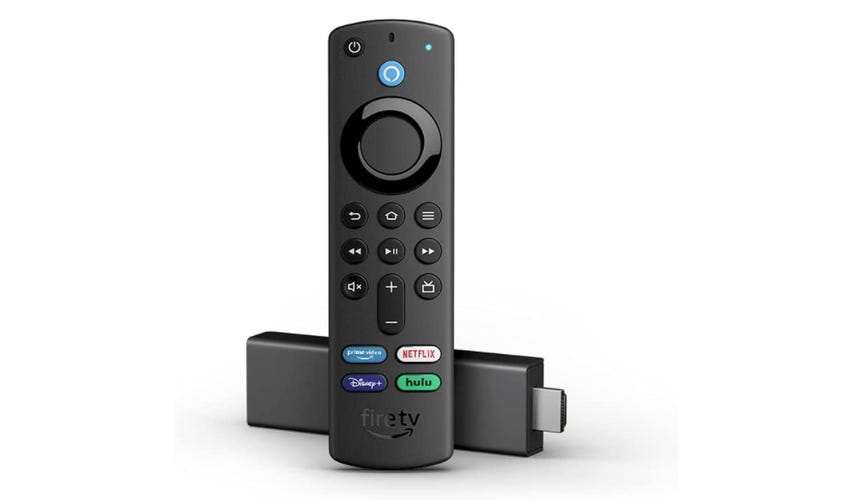
The Amazon Fire TV Stick 4K debuted in 2018 and is still around today, albeit it now comes with a 'Plus' in its name. While we generally think it's worth it to upgrade to the Max, the original Fire TV Stick 4K Plus is still a good choice for those who want 4K streaming without paying for the latest bells and whistles, namely Wi-Fi 6E and blazing-fast speed. The voice features are impressive and Echo and Dot owners can control it with Alexa. Its app and game selection is superb and responses are still fast, though not as fast as on the Max. The remote can control volume and power on TVs and soundbars. Ultimately, if the price of the Fire TV Stick 4K is close to the Max, we recommend passing on this and getting the newer and faster Max.
Pros
- Slightly more affordable
- 4K streaming
- Impressive voice features
- Great value
Cons
- Not as fast as other models
- No Wi-Fi 6 connectivity
- User interface pushes Amazon content too aggressively

The 2022 Fire TV Cube adds a handful of bells and whistles, including 4K upscaling and a faster processor, to a device that's been around for a while. The Cube has always been a mash-up of the Fire TV Stick and an Alexa speaker, allowing you to use your voice to search for shows and adjust the volume and inputs on your TV, dim lights, make Zoom calls (audio-only, unless you add a webcam), stream music and check the weather -- all hands-free. It also features an octa-core processor and 2GB of memory for lightning-fast streaming in 4K, as well as audio support for Dolby Atmos. However, the latest version of the Cube has difficulty controlling devices connected to your TV -- especially if that TV happens to be a TCL -- and often misses the mark when integrating Alexa commands with your cable box.
Pros
- Sleek design
- Speedy processor
- 4K upscaling
Cons
- Smart TV features don't work with every TV manufacturer
- Alexa isn't always reliable
- Difficult to set up equipment control in some situations
STREAMING PLAYER DEALS OF THE WEEK
- $70 (save $30)
- $75 (save $25)
- $170 (save $10)
What's the best Fire TV Stick?
When looking at all the great options offered by the Fire TV Sticks on the market, we have given our top spot to the Fire TV Stick 4K Max. It launches apps quickly, and navigating feels fast and smooth, thanks to its robust processor. It also comes with Dolby Vision support and Wi-Fi 6E for faster streaming.
The company recently announced the Fire TV Stick 4K Select — its new budget 4K streamer — which we will review as soon as it's available. In addition, the existing Fire TV Stick 4K becomes the Fire TV Stick 4K Plus, though the hardware remains the same.
Best Fire TV Sticks of 2025

Pros
- Ambient mode is useful
- Excellent picture and sound
- Loading times are zippy
Cons
- Slightly more expensive
- Interface is more crowded than ever
- Roku and Google offer better values
If you're looking for the best Fire Stick on the market, the Fire TV Stick 4K Max is it. The Max is speedy and loads apps almost immediately, and navigating is swift and smooth. Even better, the Max supports Wi-Fi 6E and the latest playback standards, including Dolby Vision. The downside to the Max is its Fire TV platform with ads featured prominently throughout, but even Roku has ads now. This streamer is a good choice for those looking for the best and fastest Amazon Fire TV stick.

Pros
- Slightly more affordable
- 4K streaming
- Impressive voice features
- Great value
Cons
- Not as fast as other models
- No Wi-Fi 6 connectivity
- User interface pushes Amazon content too aggressively
The Amazon Fire TV Stick 4K debuted in 2018 and is still around today, albeit it now comes with a 'Plus' in its name. While we generally think it's worth it to upgrade to the Max, the original Fire TV Stick 4K Plus is still a good choice for those who want 4K streaming without paying for the latest bells and whistles, namely Wi-Fi 6E and blazing-fast speed. The voice features are impressive and Echo and Dot owners can control it with Alexa. Its app and game selection is superb and responses are still fast, though not as fast as on the Max. The remote can control volume and power on TVs and soundbars. Ultimately, if the price of the Fire TV Stick 4K is close to the Max, we recommend passing on this and getting the newer and faster Max.

Pros
- Sleek design
- Speedy processor
- 4K upscaling
Cons
- Smart TV features don't work with every TV manufacturer
- Alexa isn't always reliable
- Difficult to set up equipment control in some situations
The 2022 Fire TV Cube adds a handful of bells and whistles, including 4K upscaling and a faster processor, to a device that's been around for a while. The Cube has always been a mash-up of the Fire TV Stick and an Alexa speaker, allowing you to use your voice to search for shows and adjust the volume and inputs on your TV, dim lights, make Zoom calls (audio-only, unless you add a webcam), stream music and check the weather -- all hands-free. It also features an octa-core processor and 2GB of memory for lightning-fast streaming in 4K, as well as audio support for Dolby Atmos. However, the latest version of the Cube has difficulty controlling devices connected to your TV -- especially if that TV happens to be a TCL -- and often misses the mark when integrating Alexa commands with your cable box.
Factors to consider when choosing a Fire TV Stick
Budget
Consider how much you're willing to spend on a Fire TV Stick. Higher-end models can cost up to $140, like the impressive Fire TV Cube. But if your budget is tighter, there are plenty of simpler yet effective Fire TV Sticks priced as low as $30 (on sale). While we haven't reviewed the entry-level Fire TV Stick HD, it offers HD playback for better compatibility with older TVs at $35. Plenty of options exist for a range of budgets and all your streaming needs.
Use cases
Consider what exactly you'll be using your Fire TV Stick for. Are you hoping to turn your TV into a smart TV, or are you looking for extra services beyond what your smart TV already offers? Maybe you're hoping to use your Fire TV Stick to control your smart home technology. Make sure your use cases align with the capabilities of the Fire TV Stick you choose.
4K and HDR
Models like the Fire TV Cube, Fire TV Stick 4K Select and the 4K Max support 4K resolutions and HDR protocols, while the Fire TV Stick HD does not. If you're not too concerned about high-resolution streaming or your TV model doesn't support anything above 1080p, the latter models should suit your needs. Otherwise, you may want to opt for one of the 4K Sticks.
Alexa integration
All four Fire TV Stick models have remotes with built-in voice search and control powered by Alexa. But if you're looking for something a bit more advanced, the Fire TV Cube may be your best bet. That's because it's equipped with the full capabilities of a separate Alexa speaker, allowing you to use your TV hands-free, without a remote. Full Alexa integration also means that the Cube can control your smart-home gadgets, like lights and thermostats. While plain Fire Stick variants can also do this, they require a connection with a separate Amazon Echo speaker. If you're looking for an Alexa-speaker-streaming-device combination, you'd likely be happiest with the Fire TV Cube. If this isn't your top priority, or you already have an Echo speaker, one of the Fire TV Sticks will be fine.
How we test Fire TV devices
Every Fire TV Stick we review receives hours of hands-on testing. Typically, this involves installing the device on multiple TVs, evaluating the setup process, adding popular streaming channels and using the product as if it were our own. We use all of the major features available and note how they stack up against other Fire TV models in the lineup. To do this, we hook up multiple Fire TV streaming devices to the same TV so we can switch back and forth easily to compare the experiences.
The metrics we use to rate a device include hardware design, distinctive features that differentiate models, remote capabilities and design, overall ease of use, effective layouts and design, search capabilities, privacy settings, the number of apps and their performance and the overall speed and reliability of the system.
Other TV Sticks we've tested
Roku Express 4K Plus: The Express 4K Plus streaming media player is one of the cheapest streaming TV options with 4K HDR. (Even if your current TV doesn't support those formats, your next one probably will.) Thanks to the AirPlay update, this Roku device is one of the least expensive ways to connect your iPhone or other Apple device to your TV. It is cheaper than the company's Streaming Stick 4K Plus and other 4K HDR streaming devices, and it's our top pick for best streaming device overall.
Chromecast with Google TV 4K: Chromecast outdoes Roku by adding Dolby Vision compatibility, but its biggest smart device strength is Google Assistant voice search, which works well for finding stuff to watch. We also like the impressive integration with other Google services such as Google Photos and YouTube TV. The interface is more evolved-looking than Roku, but ultimately we prefer Roku's simpler approach, no-nonsense search results and lower price. That said, the new Chromecast is a better smart streaming device choice for those already living in Google's world.
Apple TV 4K: The Apple TV 4K continues to be a good choice for those who want an Apple device to use Apple Arcade for gaming or take full advantage of their Apple One subscription bundles. Video purists will appreciate its flexible HDR and TV calibration feature. For most people, however, Apple's venerable remote control streaming device just isn't worth the money, especially now that Roku has nearly all the major apps and AirPlay. If you really want Dolby Vision, you can find that on the Roku Streaming Stick 4K at a fraction of the price.
Roku Streaming Stick 4K: The Roku Streaming Stick 4K features the same simple interface, large app selection and impressive search function found on all Roku devices, but also offers Dolby Vision support. While we think the Streaming Stick 4K is a great device, we're just not sold on the Dolby Vision upgrade -- mostly because we generally don't think that it provides a major image quality upgrade over standard HDR. But if Dolby Vision is important to you, this device will not disappoint.
